Release November 26th, 2025
CORE 1.45.2 [SciNote Premium]
This release improves SciNote’s loading speed, adds more data to exports and bug fixes!
Improvements (functional):
- Assigned items are now included in the printed protocol
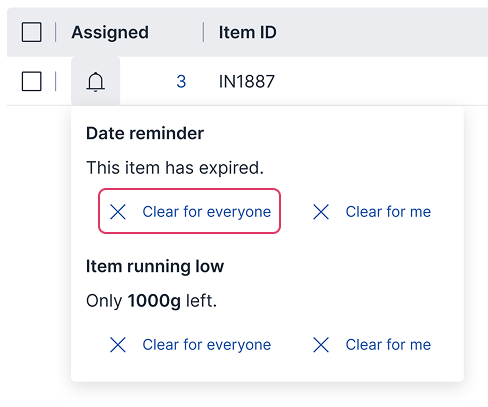
- Item reminders can now be cleared for everyone
- Item’s Location data is now included in Inventory Export
- Various improvements that improve stability of step and result native-tables behavior.
Improvements (non-functional):
- Text fields in tasks can now properly support nested lists
- Loading speed of native tables has been improved when multiple tables are added to the same task
Bug fixes (non-functional):
- Fixed a bug where direct uploads are now enabled for embedded images
- Fixed a bug where DOCX report generation failed if there was any content that looked like HTML
- Fixed a bug where copying an image in text fields across workspaces, resulted in a broken image icon
- Fixed a bug where table column names changed when moving a task into “In review” status
API changes
No API changes.
Release November 5th, 2025
CORE 1.45.1 [SciNote Premium]
This release brings two updates that enhance project tracking in SciNote and improve data classification and searchability.
Project Insights – BETA (functional)
We’re excited to announce the release of Project Insights (Beta) – a new analytics view within SciNote that offers real-time visibility into your project’s progress, tasks, and team workload.
What’s new:
- A dedicated Insights page accessible from the main navigation for all users with project access.
- Four interactive widgets:
- Status overview – See the distribution of tasks and experiments by status.
- Tasks due – Track upcoming and overdue tasks organized by urgency.
- Team workload – Visualize task distribution among project members by status.
- Bottlenecks – Identify tasks without recent activity to help keep work moving.
- Clickable elements in widgets redirect to a new filtered Tasks view, showing the corresponding task lists with applied filters.
Benefits:
- Greater transparency into project execution
- Quick identification of delays, workload distribution, and completion trends
- Faster access to relevant tasks via integrated filters
Project Insights (Beta) is available now for Professional and Advanced plan users, and for a limited 30-day time on other plans.
Learn more about this feature here in this article.

Enhanced Tags (functional)
Existing Project-bound Task tags were reworked to become Workspace-wide, enabling consistent tagging across all Tasks. Tags remain available for tagging Tasks as before, with the following new capabilities:
- Central Tag Management
- Tags are now global within a Workspace and can be applied to any Task, regardless of Project.
- A new “Tags” tab on the Workspace page shows all Workspace tags.
- Workspace owners can manage central tags: create, edit, delete, and merge duplicates.
- Improved Task Tagging Experience
- All Workspace tags are available for tagging Tasks.
- Adding or editing tags is also possible directly on Tasks for users with Workspace Owner or User roles.
- Enhanced experience for adding and removing Task tags.
- Searching and Filtering by Tags
- Use tags to narrow global search results via “Filter by tag”. Multiple tags use an OR operator.
- Filter Tasks in the table view using tags.

Read more in this article to explore improved tagging capabilities for better organization and searchability.
Improvements (functional)
- Move one or more Tasks to a different Project. Tags are retained. Assigned users are retained only when moving within the same Project.
Bug fixes (functional)
- Fixed issue with opening Projects from notifications.
Bug fixes (non-functional)
- Fixed system log errors when ‘?’ is used in global search.
API changes
- No API changes.
Release October 1st, 2025
CORE 1.45.0. [SciNote Premium]
This release introduces automation and AI features designed to streamline your workflows!
Workspace Automations (functional)
This new feature simplifies status updates across your Projects, Experiments, and Tasks. Each Workspace can enable automations based on the need to reduce manual work and to ensure efficient progress tracking.
1.Manage Automations within Workspace settings
- Workspace Owners can enable only the automations their team needs.
- Automations trigger from the moment they are enabled and don’t apply to past data. They also won’t revert if the triggering condition is later undone.
- Manual override is always allowed.
- Automated updates are traced in activities and the audit trail.
- Automation options are grouped by object type (Task, Experiment, and Project).
2.Task Automations
- Automatically update Task status to “In progress”, “Completed”, and “Done” based on predefined conditions.
- Option to disable automatic SciBot signature requests.
3.Experiment Automations
- Automatically update Experiment status to “In progress” or “Done”.
4.Project Automations
- Automatically update Project status to “In progress” or “Done”.
Read more about the feature in this Knowledge Base article and explore a new way to enable efficient, event-triggered updates!

Import with AI (BETA) (functional)
Convert your internal protocols to SciNote faster with SciNote’s first AI-powered feature: protocol import with AI is now available in Beta for anyone interested in trying it out.
- Import internal SOPs and protocols into SciNote using AI in minutes (pdf format supported)
- Minimize manual effort and reduce errors from retyping
- Accelerate your transition to a fully digitized lab with help from AI
Learn more about using this feature and its current limitations in this Knowledge Base article.

Improvements (functional):
- Duplicate inventory action now copies also column settings.
- Improved inventory item reminders aligned with the latest inventory access updates. Reminders are now sent only to users who have Owner and User access roles on an inventory.
- The option to grant access to the whole Workspace is reintroduced when creating new objects.
Improvements (non-functional):
- Improved display of smart annotations in reports.
- Archived results linked to steps are now clearly labeled.
- Step-Result links now redirect to the actual step or result, also on the Shared task screen.
- Improved email invite to SciNote for new users.
Bug fixes (functional):
- Fixed issue with cut sequence action in Sequence editor.
- Fixed issue with display of cross-referenced table data in Reports.
- Fixed issue with search in the Current work Dashboard widget.
API updates
- A link to release notes is now available in the API documentation.
- No other changes.
Release September 10th, 2025
CORE 1.44.0.2 [SciNote FREE]
This SciNote Free release includes some of the updates that were released in CORE 1.44.0.2 [SciNote Premium].
Check out the list of updates:
- User groups (available in Premium)
- Inventory access management (available in Premium)
- “Teams” renamed to “Workspaces”
- Other improvements and bug fixes
Release August 25th, 2025
CORE 1.44.0.2 [SciNote Premium]
We’re thrilled to announce that this release brings a few highly anticipated novelties to SciNote!
User Groups (functional)
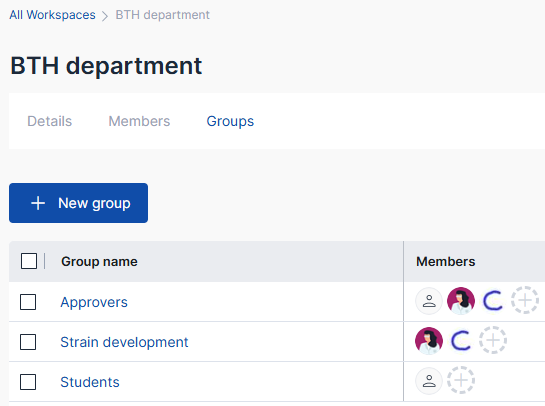
SciNote is introducing user Groups to make assigning access faster and easier – especially for organizations with complex collaboration needs.
Groups provide a powerful new way to manage user access at scale and streamline collaboration within Workspaces (formerly “Teams” in SciNote).
- Create and Manage Groups
Workspace Owners can create custom groups of members.
Each group can include multiple members; people can belong to multiple groups within the same Workspace. - Simplified Access Management
Once a group is created, use it to assign group access to Projects, Protocol templates, Forms, and Inventories.
All group members inherit the assigned role.
Individual user access assignment override group access. If the user is given access to the same object via multiple groups, the most permissive role applies to that user. - Notifications, Activities and Audit trail
Members are notified when added to or removed from groups, or when group access is granted or updated on an object.
All group membership changes, and group access changes are tracked and logged in Activities and Audit trail.
Read more in this article here. Explore the new groups tab in your Workspace settings and start organizing smarter today!
Control inventory access and permissions with precision (functional)
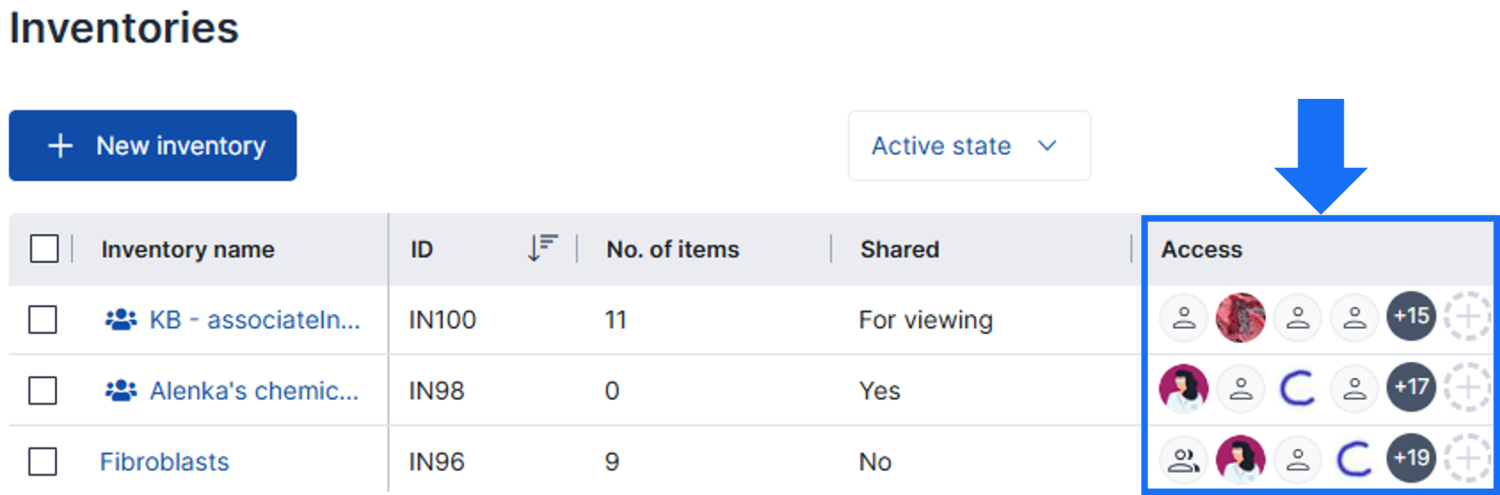
We’re excited to introduce Inventory Access Management in SciNote – a powerful new way to control who can view, edit, and manage your inventories and items.
- Manage access from the new “Access” column or toolbar within the Inventory list (as you know from other places in SciNote)
- Role-Based Permissions for Inventories
-Assign Viewer, User, or Owner roles to individual users, groups, or the entire Workspace.
*Viewer: Read-only access + exports.
*User: Everything as Viewer + add, edit, import, archive & delete items.
*Owner: Full control, including column setup and user management per Inventory.
-Shared Inventories: role-based access is applied to shared Inventories too. Depending on the sharing settings (read-only or with edit rights), Workspace Owners can choose which role to assign when granting a Workspace member access to a shared Inventory. The Inventory becomes visible to members only after access is granted. - Full Activity and Audit trail of Inventory access changes
- Inventory and item visibility enhancements
-Inventories and items are only visible to users with access.
-Items some users might not have access to are labeled as private across Tasks, Forms, print views and in the mobile app. Reports include only Task assigned items the user who generated the report has access to.
For existing Inventories, we migrated previous workspace-level Inventory permissions to the new Inventory access structure.
- Workspace owners (previously Team owners) are individually assigned to Inventories as Owners.
- Workspace users (previously Team users) are bulk assigned to Inventories with “Everyone else at…” as Users.
- Workspace viewers (previously Team viewers) are individually assigned to Inventories as Viewers.
In case of Inventories shared with edit rights, migration follows the above rules. For Inventories shared as read-only, everyone in the shared Workspace gets Viewer access to it.
This update gives you more control, flexibility, and security when managing Inventory data in SciNote. Read more in this article here.
Important notice: Renaming of Teams to Workspaces (non-functional)
We’ve renamed “Teams” to “Workspaces” to better reflect how they are used in SciNote. A Workspace is a virtual environment that defines the boundaries for data access and collaboration within a specific part of your organization.
For environments that require stricter separation—whether due to security, regulatory, or operational reasons—Workspaces provide a stable, compartmentalized structure.
To support more flexible and dynamic collaboration within each Workspace, you can now create User Groups. These groups are designed to organize users and manage access across clusters of related projects inside a Workspace.
Improvements (non-functional):
- Step notification for user mentions will now scroll to the actual step on the task protocol (applies to new notifications from release onward).
- Inventory item notification for user mentions will open the item card in the inventory (applies to new notifications from release onward).
- Result notifications will now scroll to the actual result on the task page (applies to new notifications from release onward).
- Locked users no longer appear on the list of users available to grant access to objects.
- API service endpoint for instance data dumps (only available per request).
Bug fixes (non-functional):
- Fixed issue with importing inventory items file.
- Fixed issue with missing cell data in exported step/result table.
Bug fixes (functional):
- Fixed issue with assigning item to task from item card in table/well plate.
- Fixed issue with setting experiment start/due date.
API changes
- Inventory access is checked for API calls related to Inventories and Task Inventory Items.
- “Team” naming remains present in API endpoints to keep the backwards compatibility.
Release July 29th, 2025
CORE 1.43.0. [SciNote FREE]
This SciNote Free release includes some of the updates that were released from CORE 1.42.0. to CORE 1.43.0. [SciNote Premium].
Check out the list of updates:
- New fields for streamlined project management in SciNote
- Favorites
- Link Task results to steps
- Other improvements and bug fixes
Release July 9th, 2025
CORE 1.43.0. [SciNote Premium]
Link Task results to steps (functional)
We’re excited to introduce a new feature in SciNote that enhances transparency, traceability, and workflow clarity: Protocol Step–Result Linking!
To create step-result links, navigate to a Task and go to either the protocol step or result. Use the new “Link to results to this step” or “Link to step” option to establish a connection.

Once linked, simply click the reference to jump directly to the related step or result.

Benefits:
- Bidirectional Linking: Create links from either the protocol step or the result—whichever suits your workflow best.
- Contextual Navigation: Clicking a link from a protocol step takes you directly to the related result, and vice versa.
- Improved Traceability: Establish a transparent relationship between experimental steps and observed results to support reproducibility and reporting. Created links are traced in audit trails, displayed in reports and shared tasks.
This feature is designed to help you keep your experiments organized and your data interpretation streamlined. It provides a clearer understanding of how each procedural step leads to specific outcomes.
By visually connecting what was done (steps) with what was observed (results), you can ensure better documentation, collaboration, and scientific integrity across your team.
Improvements (non-functional):
- Improved 203dpi label template to support proper print out of long item names.
- Improved behavior of collapsing and expanding results when more than ten results are present on Task.
- Technical maintenance and upgrades.
Bug fixes (functional):
- Fixed bug in adding text result via Mobile app.
Bug fixes (non-functional):
- Historic formatting in Experiment descriptions has been migrated (if applied) to work with the newly added formatting options.
- Fixed bug in display of global search results page for Task results and Protocol templates.
API changes
No changes
Release June 18th, 2025
CORE 1.42.0. [SciNote Premium]
New fields for streamlined project management in SciNote (functional)
This release brings a comprehensive upgrade to project and experiment management in SciNote, by introducing new metadata fields, dashboard improvements, and enhanced visibility across your workspace.
New metadata fields for Projects and Experiments:
- Status – Track the progress of your projects and experiments. Available statuses: Not started, In progress, and Done.
- Start Date and Due Date – Specify when work starts and when it’s due. Due date alerts and notifications help ensure deadlines are never missed.
- Description – A dedicated description field is now available on projects (already available for experiments). The field now supports rich text formatting for better documentation. Quickly access it from within project or experiment pages via the new “Description” button.
- Number of Experiments done / Tasks done – Easily monitor progress with automatically calculated indicators showing what percentage of work has been completed.
- Head of Project – Assign a responsible team member using this field (available only on Projects).
You can customize views by showing or hiding columns and reordering them via the “Manage columns” button.
These new fields are included in SciNote’s DOCX and PDF reports, as well as global search, filters, activities, and audit trails.
Favorites (functional)
You can now mark Projects, Experiments, and Tasks as favorites for quicker access and better prioritization.
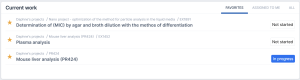
All your starred objects appear in a new “Favorites” tab within the “Current work” widget on the Dashboard. Favorites are listed chronologically, with the most recently starred objects shown at the top.
Improvements (functional):
- Audit trails export now includes object IDs in “name” column and new “parent_id” column.
- Card view has been sunset on Projects and Experiments pages.
- Webhook payloads can now include additional object data (optional setting).
- Webhooks are enabled for all environments.
Improvements (non-functional):
- Audit trails now include parent object IDs.
- Visual improvement of breadcrumbs on some pages.
- Improved expand/collapse icon in the “Move project” window.
- Improved steps expand/collapse behavior on Protocol Template page.
- “Current tasks” widget on the Dashboard renamed to “Current work”.
- “Recent work” widget on the Dashboard renamed to “My recent activity”.
Bug fixes (non-functional):
- Fixed issue with results page display on mobile devices.
- Loading improvements for inventory items.
Bug fixes (functional):
- Fixed issue where the “Send” button in comment fields was hidden on mobile devices.
- Resolved problem with currency data import to inventories.
- Fixed issue with submitting e-signatures using OpenID SSO with Azure.
API changes
- Added support for additional JSONB metadata fields on API endpoints for Projects, Experiments and Tasks.
- Updated Project and Experiment API endpoints include newly introduced fields mentioned above. Note: The existing project start date field now accurately represents the actual start date. If you were previously using it to retrieve the project’s creation date, please refer to the new “created at” field instead.
- Added support for adding step text title via the Step Text V2 API endpoint.
- Added the ability to add, edit or remove the task protocol title and description via API.
Release May 13th, 2025
CORE 1.41.1. [SciNote Premium]
Combine steps from existing Protocol templates (functional)
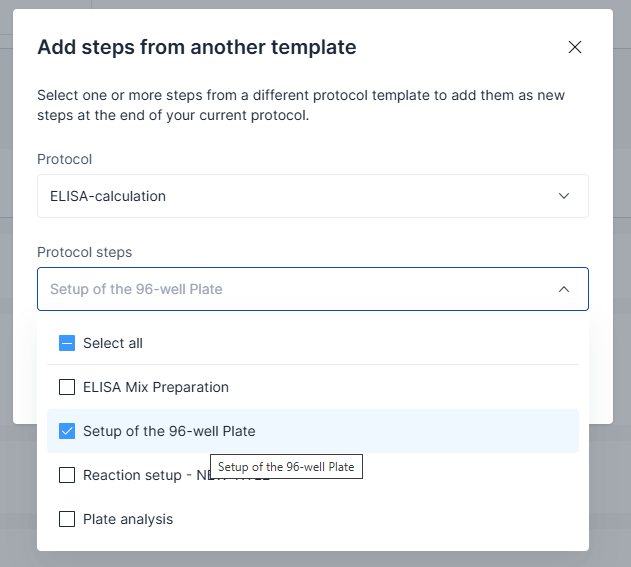
You can now load steps from existing protocol templates directly into a task using protocol actions menu. This allows you to reuse and combine procedures without recreating them from scratch.
The same option is available when building new protocol templates, helping you quickly assemble templates based on published procedures you already use.
Only steps from published protocol templates can be selected, and they will be added to the end of the current protocol. Note: If added steps include formulas referencing multiple tables, the formulas must be updated accordingly.

Quickly create Inventories with prebuilt templates (functional)
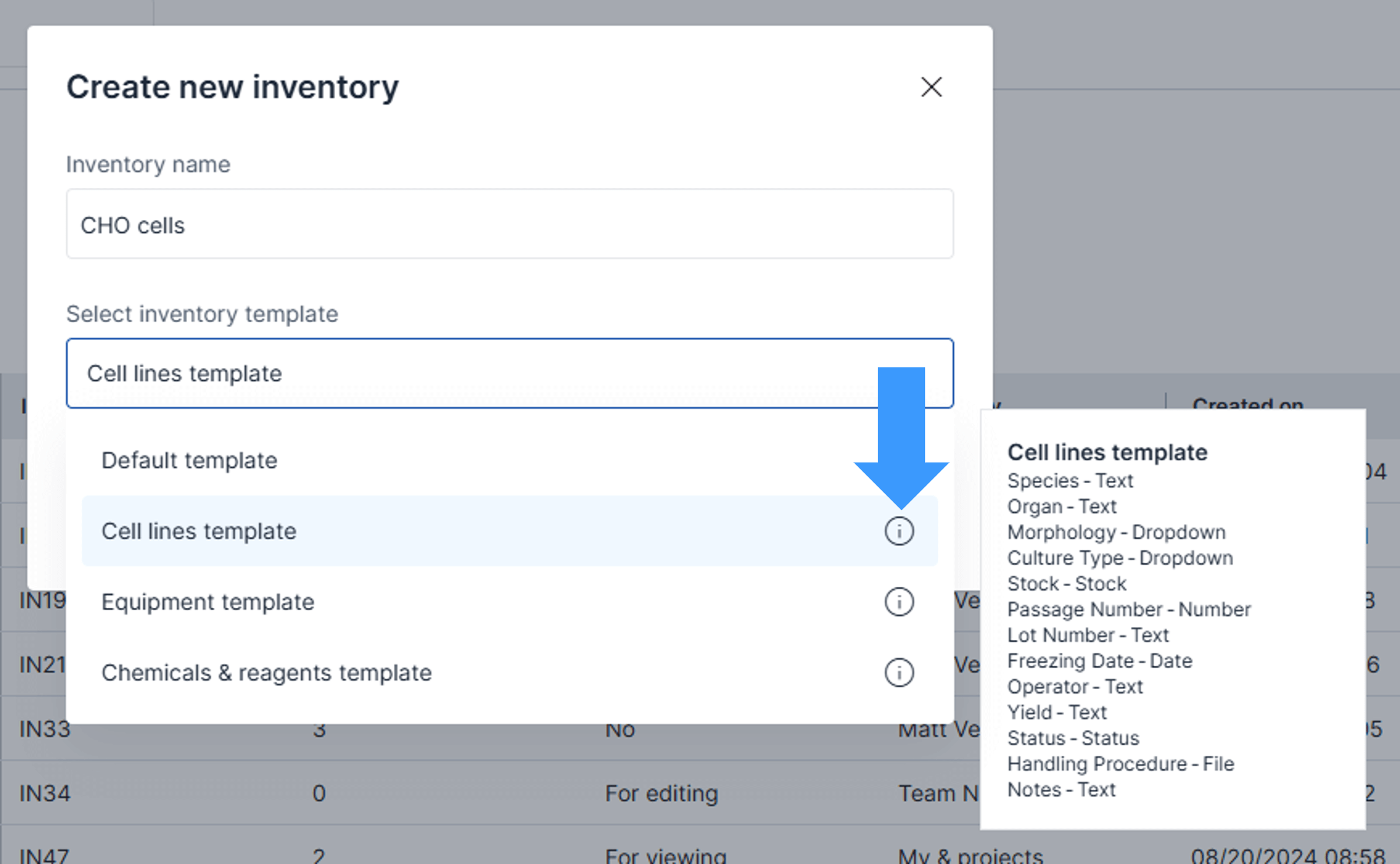
Speed up inventory setup with our new prebuilt templates, designed to help you organize inventory items more efficiently.
Each template includes predefined columns tailored to specific inventory types. You can view the included columns by clicking the info icon next to the template name. Inventories created from templates remain fully customizable—you can adjust or expand them to fit your needs.
Available template options:
- Default – Starts with an empty inventory (no predefined columns)
- Cell Lines – Includes columns suited for storing cell line data
- Equipment – Includes columns for managing laboratory equipment
- Chemicals & Reagents – Includes columns for tracking various chemicals and reagents
Improvements (non-functional):
- Improved behavior of step expand/collapse functionality
- Improved loading of formulas in step and result tables when using cross-table references. A new option to reload table formulas is now available in the toolbar.
- File upload and preview limits increased to 350 MB (not applicable to Free, Professional and Enterprise plans).
Bug fixes (non-functional):
- Fixed missing activity logs when duplicating storage locations.
- Fixed missing user data display in audit trail records.
Bug fixes (functional):
- Fixed an issue with filtering storage location activities when combining filters for locations and inventory items.
- Resolved an issue where printing protocols didn’t work in some cases with older native step/result tables.
- Fixed an issue with dot decimal separator in forms.
API changes
- No updates.
Release May 13th, 2025
CORE 1.41.1. [SciNote FREE]
This SciNote Free release includes some of the updates that were released from CORE 1.39.2. to CORE 1.41.1. [SciNote Premium].
Check out the list of updates:
- Updated protocol step and task result tables
- Create inventory items directly on tasks
- Combine steps from existing protocol templates
- Other improvements and bug fixes
Release May 7th, 2025
CORE 1.41.0. [SciNote Premium]
API changes
- Existing Step endpoints have been updated to support the new Forms feature.
- New API endpoints have been added to retrieve form response data from steps that include Forms.
Release April 23rd, 2025
CORE 1.41.0. [SciNote Premium]
Reliable and compliant data collection with Forms (functional)
Create forms, worksheets, batch records and sample sheets directly in SciNote!
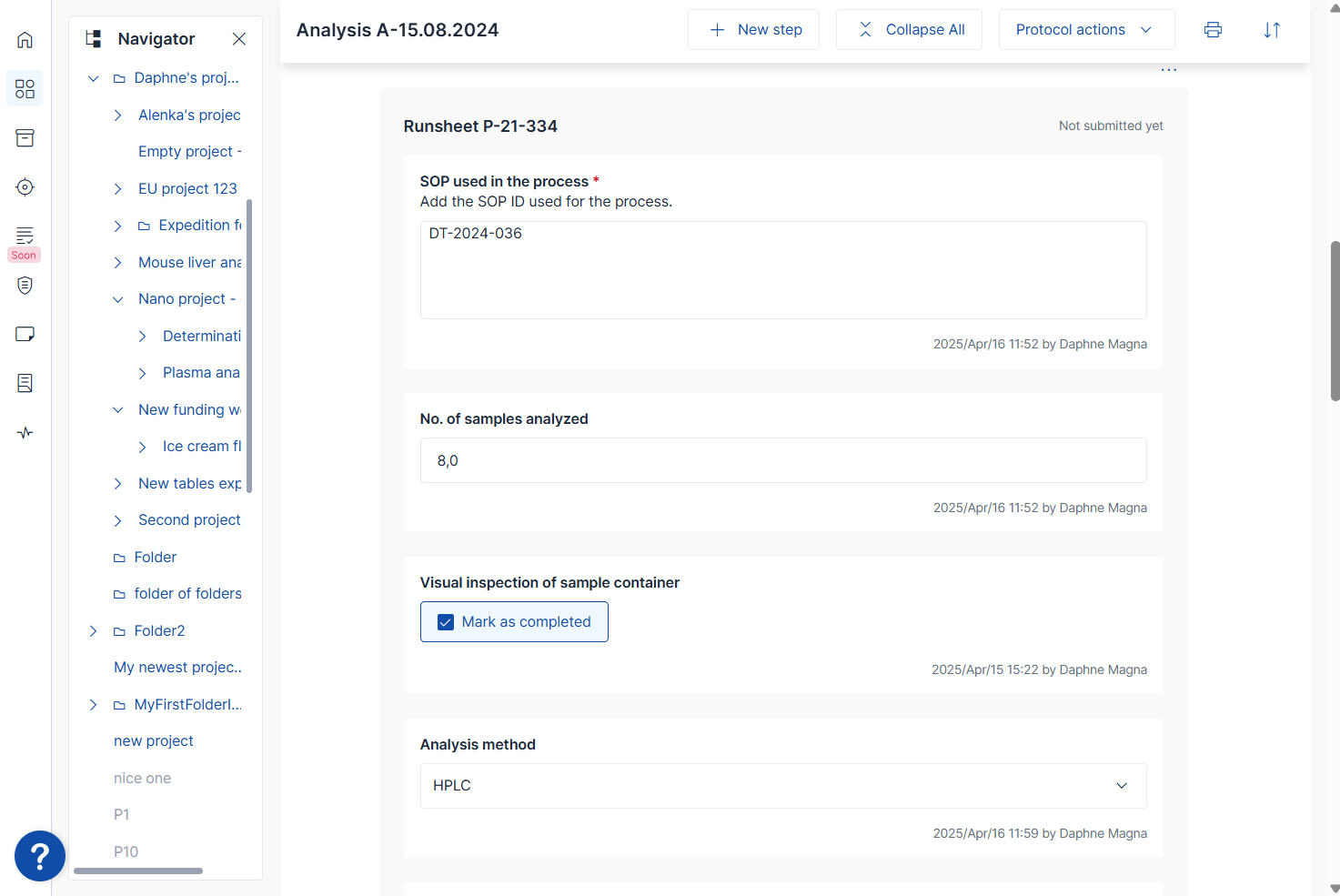
The new Forms feature enables reliable, efficient, and standardized data collection throughout your protocol steps and tasks—helping reduce errors and improve traceability. Read more about what are Forms in this article here.
Forms allow you to:
- Create and manage reusable form templates.
- Include various data field types such as text, single- and multi-select dropdowns, number fields, date & time, inventory items, and action fields—with configurable behavior settings for each field.
- Preview and test forms prior to publishing.

- Insert forms directly into protocol steps (in both templates and tasks) for streamlined and standardized data entry.
- Submit forms data within task steps, with automatic timestamps and full activity log and audit trail support.
- Export submitted data in .xlsx format for analysis or external reporting.
- Forms are included in shareable tasks, printed protocol and reports for consistent documentation.
Learn how to use this new feature in this article on the link here.
Note: The Forms feature is not included in all SciNote plans. Please contact your account manager if you’d like to enable it for your lab.
Improvements (functional):
- New Reviewer role on Projects, Experiments and Tasks: a new predefined role is now available in specific SciNote plans, providing more granular access controls tailored for regulated workflows and approval processes.
Improvements (non-functional):
- Improved handling of large file uploads to support more robust data entry and file storage needs.
Bug fixes (functional):
- Fixed issues with specific cell merging and click-away action in tables.
- Fixed the issue that prevented resetting stock consumption to zero.
- Fixed the issue that prevented storing negative numbers in inventory fields.
Release March 26th, 2025
CORE 1.40.0. [SciNote Premium]
Create inventory items directly on tasks (functional)
Are you creating new samples or producing reagents while following a protocol on tasks? You can now create new inventory items directly from the Assigned items section in Task.
Mark an item as output if you want to differentiate it from the items used, ensuring traceability of both materials consumed and produced in your work.

New capabilities in Storage locations (functional)
We’ve made several improvements to Storage locations based on your feedback.
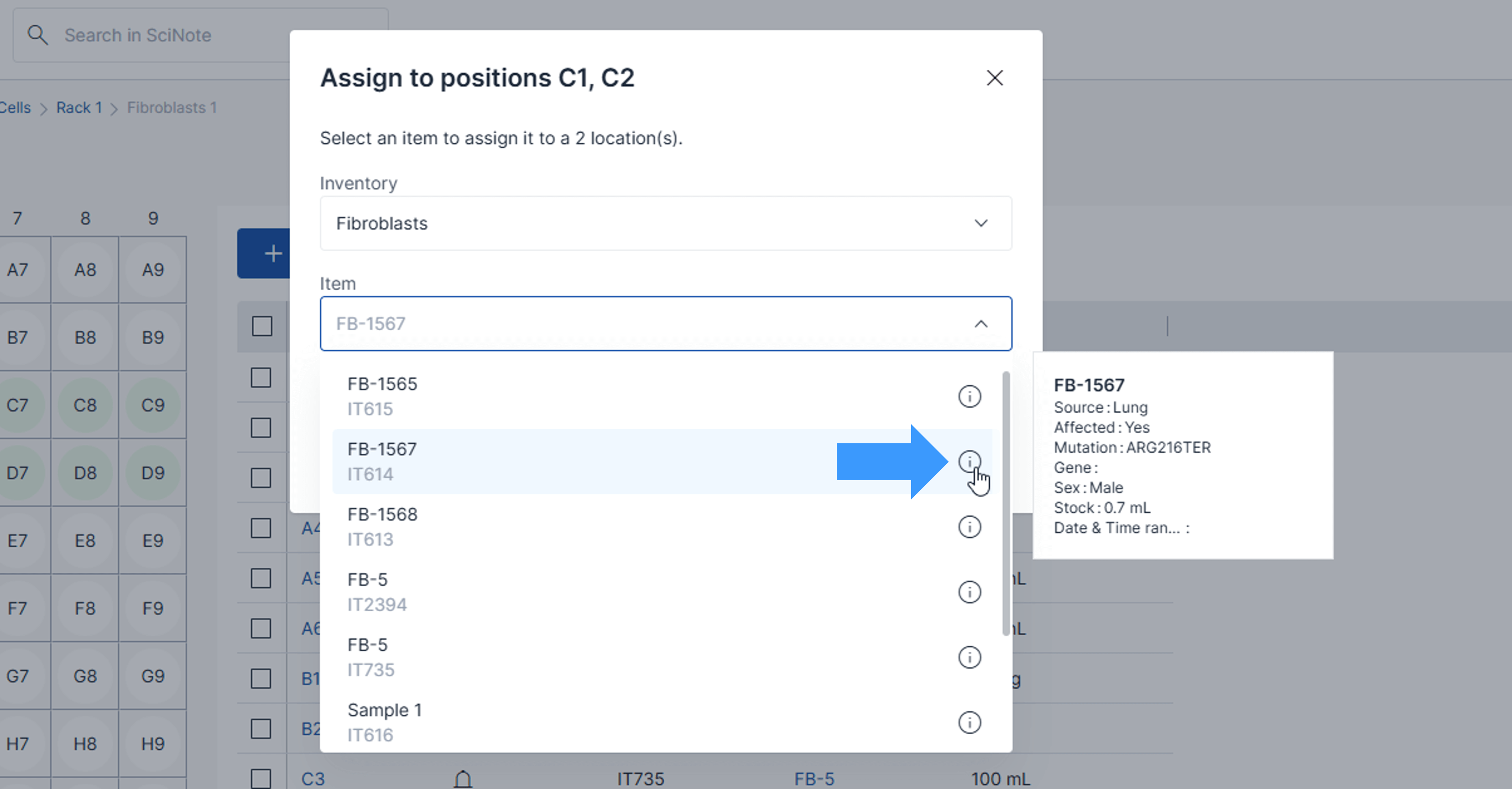
- Select multiple box positions to assign item – Select any number of box positions, an entire row, or a column, and assign an item. Clicking on a row/column selects all empty positions. Clicking again deselects them.
- View additional item properties – When searching for an item to assign to a storage location, you can now access more item details under the info icon next to the item’s name.
- Find items across all location levels –The new “Find item” option lets you search for an item across any storage location. The system will display all locations where the item is stored.

Updates in left menu (non-functional)
The left navigation menu has been updated to a more compact design, providing more space for the content you interact with. This change also greatly enhances usability on smaller devices like tablets.
Improvements (functional):
- Import data into step and result tables from .xlsx: You can now import data into step and result tables using an Import button in the table toolbar.
- Docx reports display step and result tables formatting: Majority of the formatting applied to the new tables is not reflected in the .docx reports.
- Admin access for Single Sign-On: Organization administrators can now always log in via the new Admin Access option if SSO is unavailable.
- Task inventory item snapshots improvement: User who locked a task is now logged as a creator of the inventory item snapshot.
- Resolved an issue with audit trail export: User timezone settings no longer affect the date filter for audit trail export.
- Update in new member invitation link expiry
Improvements (non-functional):
- Visual enhancement of task tags.
- Improvements to smart annotations display.
- The add item relationship window now provides additional item details when selecting an item to link as a parent or child.
- Minor improvements and bug fixes.
- Security updates.
API changes
- No updates.
Release March 5th, 2025
CORE 1.39.2. [SciNote Premium]
This SciNote Premium release includes enhanced Step and Result Tables and Well plates as well as a set of improvements and bug fixes.
Enhanced tables and well plates (functional)
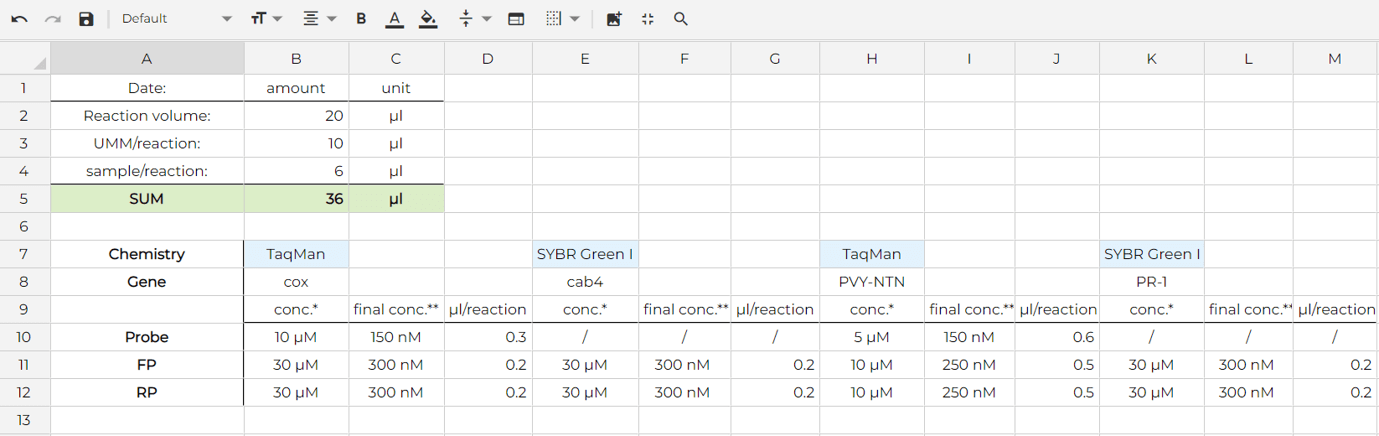
We’re excited to introduce enhanced tables and well plates to make your workflow even more efficient! With this update, old tables and well plates are replaced with new customizable tables within your protocol steps and task results, giving you more control and flexibility over your data.
What’s New?
- Table toolbar – Apply multiple formatting options, including font styles, sizes, colors, text alignment, and border styles directly from the table toolbar. Additionally, you can merge cells for better organization and customization.
- Copy & Paste or double-click to extend – Easily duplicate or transfer data between tables. Double click on the bottom right cell corner or grab and drag to quickly extend the applied cell content.
- Rename columns – Customize column names to fit your needs (not available in well plates!).
- Hide columns or rows – Keep your tables organized and readable.
- Lock cells – Indicate restricted editability for specific cells when needed.
- Resize, rearrange and sort – Adjust column and row sizes, and drag to reorder. Sort content by column.
- More formulas & Cross-table calculations – Perform advanced calculations across multiple tables. Read more about the formulas here.
- Smart annotations – Hashtag other objects or mention people inside cells.
- Keyboard shortcuts – Navigate and edit tables faster with shortcuts.
These improvements make it easier than ever to structure, analyze, and manage your data within
your protocols. Try out the new features and let us know what you think!
Learn more about how to use new tables here.
Improvements (functional):
- Stock editing is disabled when inventory item row is edited to avoid unwanted row submit. Item stock editing is still available directly in the Stock column and on item card.
Improvements (non-functional):
- Fixed issue for step date format not matching format set in preferences.
- Forms promotion.
- Activity filters improvements
- Other small improvements and bug fixes.
- Security updates.
API changes
- Updates in API documentation for tables and well plates
Release February 24th, 2024
CORE 1.39.1.2 [SciNote FREE]
This SciNote Free release includes some of the updates that were released from
CORE 1.37.0. to CORE 1.39.1.2 [SciNote Premium].
Check out the list of updates:
• Notifications: You can mark each notification separately as Read or Unread
and we also added tabs for “Read”, “Unread” and “All” notifications
• Reports: auto-selected default template, new options to exclude task
metadata and include specific inventory columns
• Rename protocol templates in each draft
• Loading speed improvements
• Other improvements and bug fixes
Release February 12th, 2025
CORE 1.39.1. [SciNote Premium]
This SciNote Premium release includes a set of smaller improvements and bug fixes.
Small improvements (Functional)
- Change in project updated behavior: Viewing a comment no longer triggers a project update.
- Added one additional default ZPL label template (203 dpi) available for all users.
- Manuscript Writer end-of-life.
Small improvements (Non-functional)
- Updated My profile page.
- Optimized speed for global search, activities, and audit trails.
- Performance improvements.
API changes (Functional)
- Added username data in the file upload endpoints.
Bug fixes (Functional)
- Fixed the issue where exports failed when snapshot item was deleted.
- Fixed the issue where not all users were displayed in the task assigned users dropdown list.
- Fixed the issue where email notifications were not sent for date/datetime reminders.
Release January 29th, 2025
CORE 1.39.0. [SciNote Premium]
This SciNote Premium release includes a set of smaller improvements and bug fixes.
Improvements (functional):
- Early access for a feature called Forms.
Improvements (non-functional):
- Fix in displaying the ampersand sign.
- Other small improvements and bug fixes.
API changes (functional)
- API endpoint for assigning inventory items to tasks.
SciNote User Reviews

Connect with us


SciNote Newsletter
Receive SciNote ELN news, webinars and articles.