Release October 7th, 2026
CORE 1.50.2. [SciNote Premium]
What’s new:
Improvements (functional):
- We’ve added to Date & Time form fields optional validation that prevents selecting future dates.
- Number form fields no longer automatically add trailing zeros (in user interface, in reports and exports)
API changes:
No updates
Release September 28th, 2026
CORE 1.50.1. [SciNote FREE]
This SciNote Free release includes some of the updates that were released in CORE 1.50.1. [SciNote Premium]
Release September 14th, 2026
CORE 1.50.1. [SciNote Premium]
What’s new:
Improvements (functional):
- We’ve improved locking of entire steps in Protocol templates: all user roles that can modify a Protocol template can now lock entire steps in addition to locking individual step components.
- We’ve removed the “Keep existing” option from the following Protocol actions on Task: “Revert Protocol” and “New Version Update”; “Overwrite existing task content” is now the only and default option.
Improvements (non-functional):
- We’ve exposed Manage steps and Manage Results actions directly in UI in Protocol templates.
Release August 19th, 2026
CORE 1.50.0. [SciNote FREE]
This SciNote Free release includes some of the updates that were released in CORE 1.50.0. [SciNote Premium]
Release August 12nd, 2026
CORE 1.50.0. [SciNote Premium]
What’s new:
We’re rolling out a few new functionalities and introducing a 60-day trial trial of GxP functionalities. Read more below.
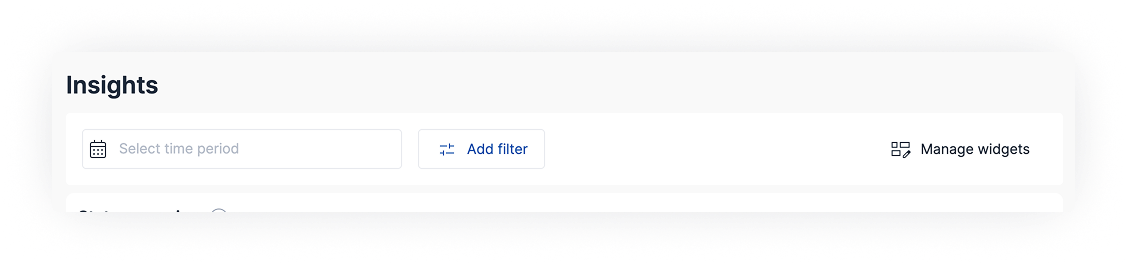
Insights – Additional Filters and new Widget
Insights have been expanded with multi-project support, more powerful filtering, a new widget, customization options, and improvements to existing widgets.
You can now select which projects the widgets should display data for, save your project folder selection so you only make it once, and choose a specific date range. We’re also introducing ‘Manage widgets,’ which allows you to show, hide, and rearrange widgets.
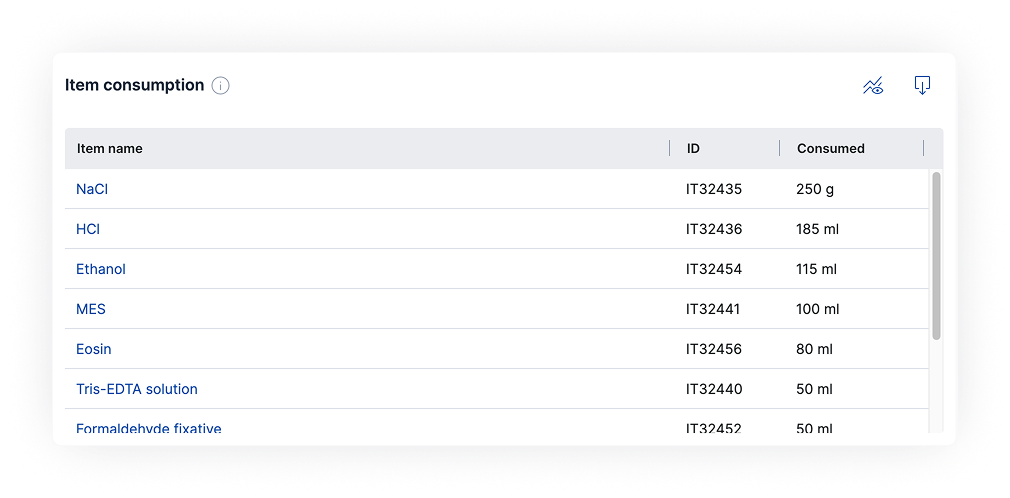
We’re introducing a new widget – Item consumption – which summarizes the consumption of all items in the selected date range, projects, and inventories. You can export the data shown in the widget with a single click.
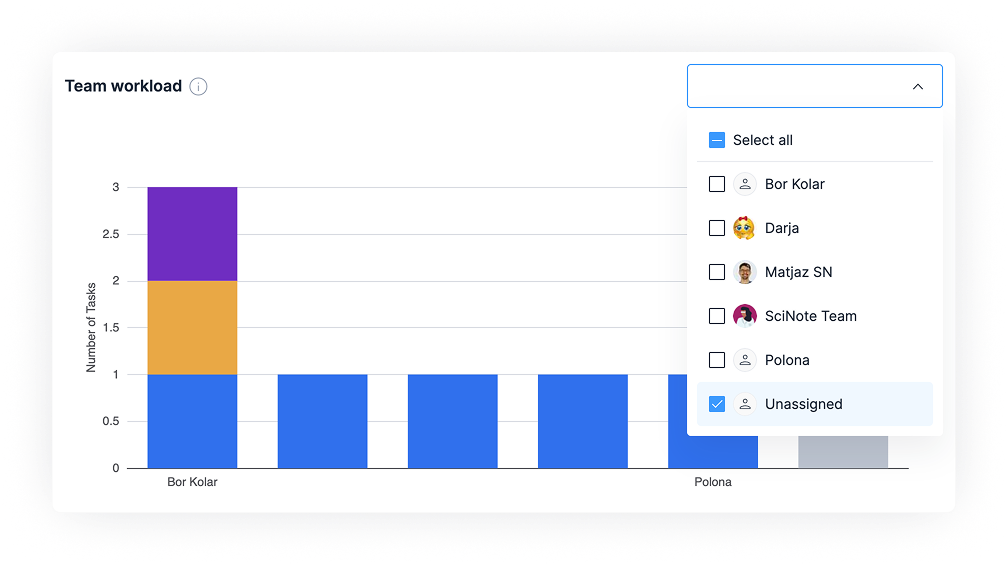
As an improvement to the current “Team workload” widget, you can now filter out the unassigned tasks.
Insights are available to Professional and Platinum plan users.
Organization-wide Timezone and Date Format (functional)
Organizations can now set a standard timezone and date format for all users in the account. Once configured in Organization settings, all dates and times across SciNote are displayed consistently, regardless of individual device settings — making collaboration across time zones clearer and more reliable.
This functionality is available to Platinum plan users. *
Protocol Locking (functional)
Protocol templates now support content locking, giving you greater control over standardized procedures. Protocol Template owners can lock steps and content blocks, including tables, forms, checklists, and attachments, to prevent edits once the content is finalized. Users working from a locked protocol template will see locked sections as read-only, ensuring the integrity of your approved workflows.
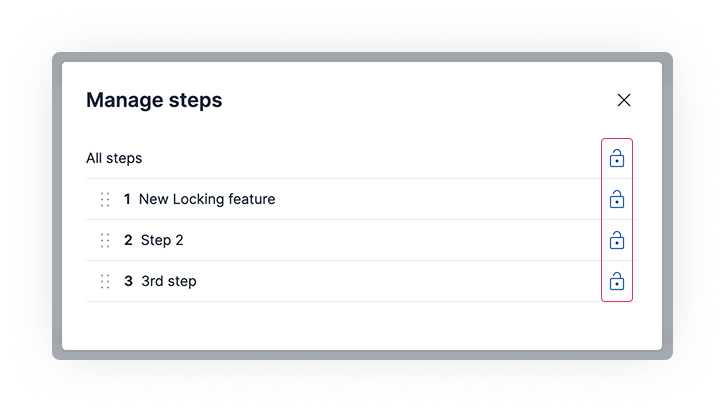
Content locking is available to Platinum plan users.*
Improvements (functional):
- Organization settings now include a configurable session timeout option, letting administrators control how long users can remain inactive before being signed out.
- Item cards for live inventory items now include a direct link that takes you straight to that item in the inventory, reducing the steps needed to navigate between tasks and stock.
- Links on equipment scheduling item cards now open in a new browser tab, so you do not lose your current view.
- We’ve added validation to prevent duplicate sheet names within native tables, helping avoid conflicts and broken references between tables.
Bug fixes (functional):
- Fixed: Observers were not notified when a file was updated using the online editor.
- Fixed: Users did not receive notifications when they were mentioned inside a spreadsheet table.
- Fixed: Date range fields were incorrectly shown as invalid in completed forms.
- Fixed: A report template could be selected before choosing a project during report generation.
- Fixed: Inventory items and inventories could not be deleted in certain cases.
- Fixed: Archived files could still be opened and edited using the online editor.
- Fixed: Locked cells in tables became unlocked when the decimal formatting option was used.
- Fixed: The rightmost column disappeared from a table after using the Refresh Formulas option.
- Fixed: PDF report generation failed in some cases.
- Fixed: Some login events were not recorded in the system log.
- Fixed: Tables incorrectly showed activity notifications when the page was first opened.
Bug fixes (non-functional):
- Fixed: PDF reports had inconsistent visual styling when generated using the dedicated PDF conversion service.
- Fixed: A security vulnerability has been resolved as part of regular maintenance operations.
API changes:
- API responses for steps and step content blocks now include locked status fields
- API responses for results and result content blocks now include locked status fields
*60-day trial of GxP functionalities
You can now test a set of capabilities that make SciNote even more useful in GxP environments. These are available to all customers as a 60-day trial and include:
- Deletion restriction settings (ask your SciNote admin to enable)
- Protocol content locking
- Organization-wide timezone and date format control (ask your SciNote admin to enable)
Contact your Customer Success representative for more information.
Release July 1st, 2026
CORE 1.49.1. [SciNote Premium]
What’s new:
Equipment scheduling (functional)
We’re introducing a powerful new way to manage your lab equipment with Equipment scheduling where you can view, schedule, and manage bookings for inventory items such as equipment, reagents, reference materials, and samples.
With a dedicated scheduling calendar featuring daily, weekly, and monthly views, your team always knows what’s happening with your inventory. Each booking event captures everything you need: a title, event type (Usage, Calibration, Maintenance, or Other), assigned team members, and a precise date and time range.
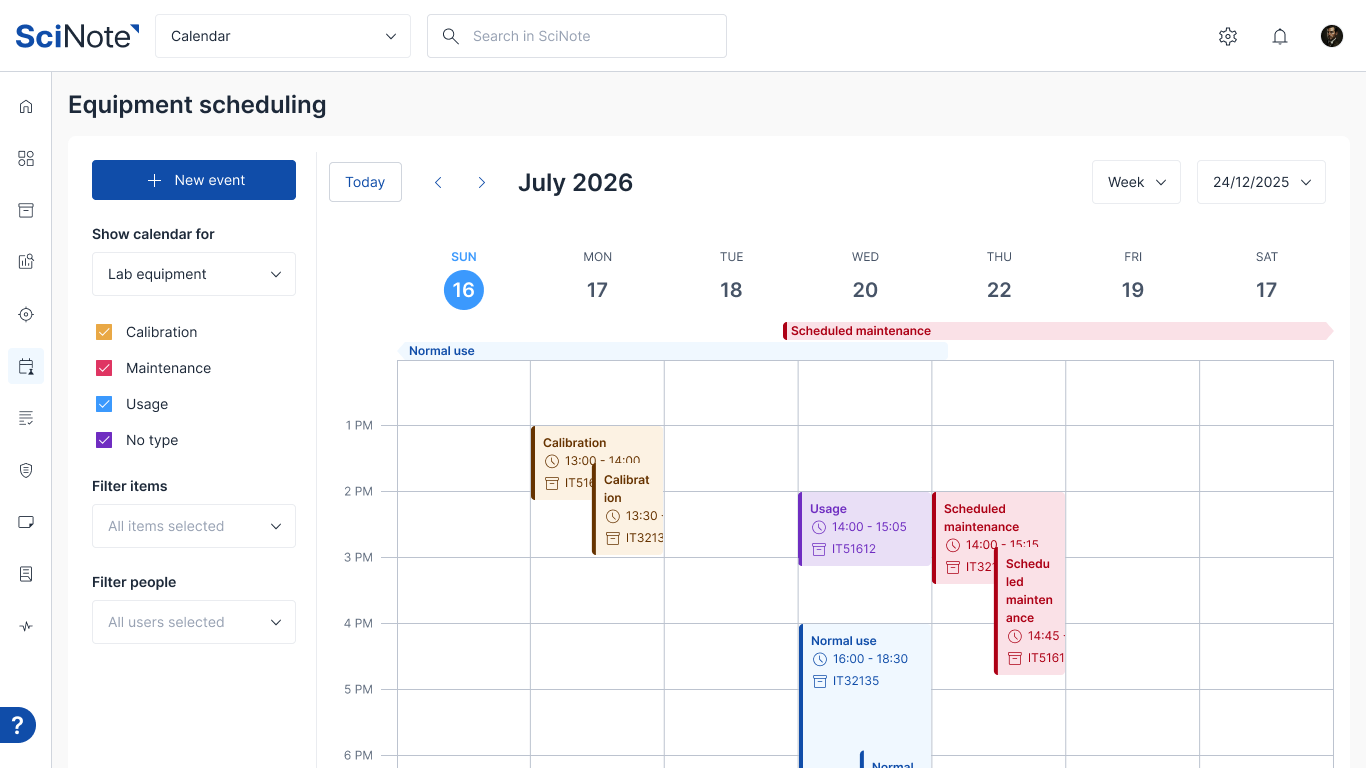
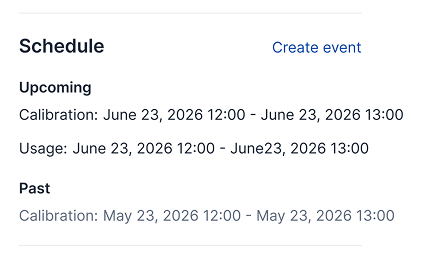
Creating a booking event is possible directly from the calendar, from an inventory item’s action toolbar, or from the new Schedule section on each item’s item card. When you create or update a booking, the people listed in the event receive an in-app notification and an email. A reminder is also sent 24 hours before the event starts.
Equipment scheduling is available on Professional and Platinum plans, with 30-day trial for Essential plan.

Improvements:
Improvements (functional):
- Activity log entries for equipment booking events now link directly to the relevant inventory item card, making it easier to navigate from an activity to the item it relates to.
- Inviting new users to a workspace now activates the Invite button as soon as two characters have been entered, reducing unnecessary friction when adding new team members.
- The number of inventory stock units is now configurable.
Bug fixes (functional):
- Fixed an issue where clicking a keyword tag on the Protocol Templates list filtered the results but did not populate the search bar. Users now see the active filter in the search bar and can clear it easily.
Bug fixes (non-functional):
- Fixed an internal error that appeared in the browser console when clicking near a checkbox on the Projects list. This had no visible effect for users but has been cleaned up.
- Values stored in Inventories in Number type columns without decimals are now printed on labels without decimals and exported from Inventories in CSV without decimals.
- Fixed an issue where long inventory names were displayed over the items listed in Assigned items modal on Task.
- Fixed an issue where Task protocol scrollbar disappeared after assigned items pop-up window was opened.
API changes:
- No API changes.
Release July 1st, 2026
CORE 1.49.1. [SciNote FREE]
This SciNote Free release includes some of the updates that were released in CORE 1.49.1. [SciNote Premium]
Release June 10th, 2026
CORE 1.49.0. [SciNote Premium]
What’s new:
Archive Steps and Results (functional)
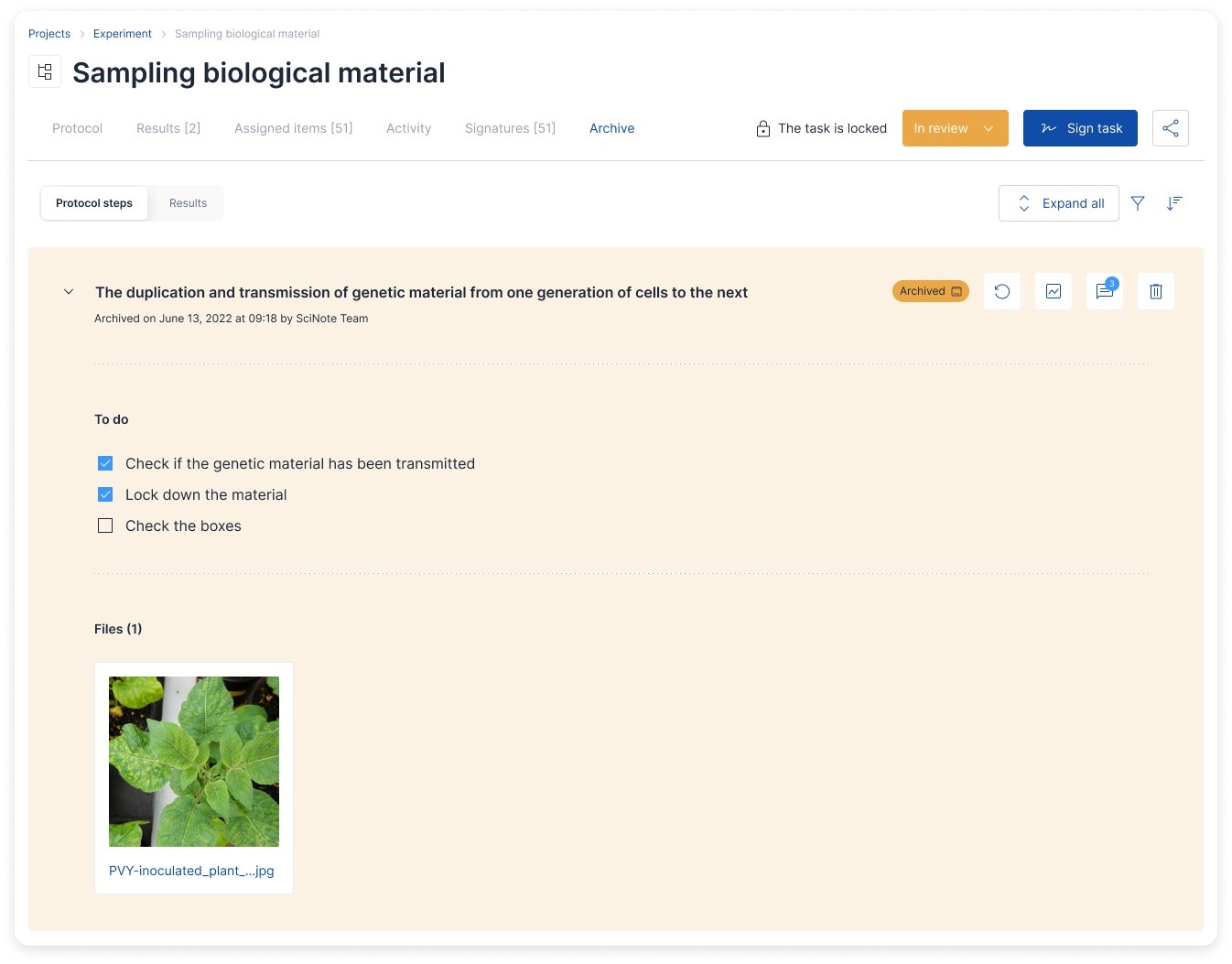
We’re unifying archiving and deletion of Protocol Steps and Results on Tasks. You can now archive entire Steps and Results or their content blocks (such as text, tables, files, checklists, and forms) and delete them from the Archive if needed.
Archived Steps and Results now have a new home on Task page: the “Archive” tab.
Ability to restrict deletion of Steps, Results and Inventories at Workspace level (functional)
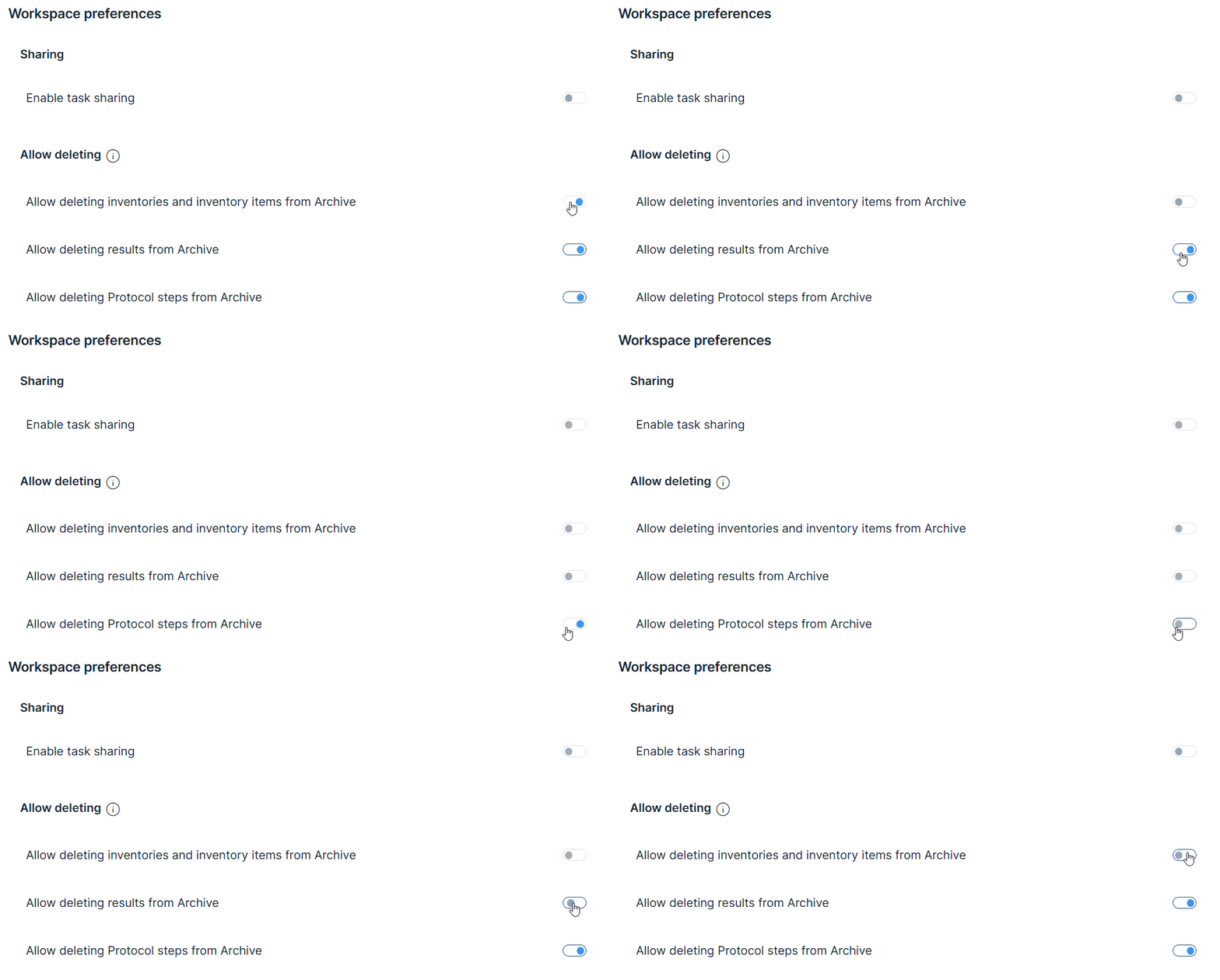
As part of continuous GxP and data integrity improvements, organization administrators who are also Workspace owners can now control whether Task Protocol steps, Results (and their content blocks such as text, tables, files, checklists, and forms) and Inventory items and entire Inventories can be deleted from archive or whether they can only be archived.
This is configured at the Workspace level, ensuring all workspace users follow the same data retention rules set by your organization. When deletion is restricted, content is moved to a dedicated “Archive” tab on the task page or Inventories rather than deleted, where it remains visible and can be restored if needed.
Along with role-based access management, this new option gives organizations the flexibility to set stricter data retention policies for teams where it is needed (e.g. GxP teams), while giving more freedom to research teams.
A note: SciNote operates with full built-in traceability, so even when records are deleted, they continue to be accessible via immutable Audit trails.
This functionality is available for Platinum plan users.
 Audit Trails — Advanced Filtering and Export (functional)
The Audit Trails page has been significantly expanded with new filtering and export options. You can now filter audit records by user, action type, object ID, and parent object name, making it much easier to find specific changes across large datasets. The CSV export has also been updated to support all active filters, contains a dedicated Object ID column and the order of columns is now the same as on Audit trail page. Additionally, actions performed automatically by the system are now clearly shown as “System user” in the audit log, and activities for inventory snapshots are now properly recorded.
Improvements (functional):
- Improved warning messages when working with shared inventories — notifications are now clearer when inventory items are used across multiple experiments or projects.
Bug fixes (functional):
- Fixed an issue where clicking a status in the Project Insights Team workload chart redirected to an unfiltered list instead of showing only items with that status.
- Fixed an issue where tasks with a pipe character (|) in their name could not be duplicated on the workflow view.
- Fixed an issue where skipping a step or marking it complete incorrectly flagged a linked protocol template as modified.
- Fixed an issue where following a direct link to the Assigned Items tab on a task did not automatically switch to the correct workspace.
- Fixed an issue where the import option on a table appeared available even when the task was locked for editing.
- Fixed an issue where PDF and DOCX files with uppercase file extensions were not included when generating a report with the “Insert pages from PDF and DOCX files” option enabled.
- Fixed an issue where the “Last modified” date on a protocol template was not updated when a new empty step was added.
- Fixed an error that prevented users from creating tables or adding comments in task results.
- Fixed an issue where optional date fields in forms were incorrectly treated as required, blocking submission when left empty.
- Fixed an issue where projects containing broken image attachments could not be exported.
- Fixed an issue where images embedded in rich text fields appeared as broken in audit trail records.
- The maximum number of stock measurement units available per inventory is now configurable, removing the previous fixed limit.
Bug fixes (non-functional):
- Fixed an issue where hover labels occasionally remained visible on screen after moving away.
- Resolved several minor interface warnings on the Task page with no visible impact on users.
- Cleaned up outdated internal components used by the data grid to improve long-term stability.
- Updated internal security dependencies to address a known vulnerability.
API changes:
- Fixed an error returned when updating an inventory stock value’s unit via the API when no unit had previously been set.
Release June 9th, 2026
CORE 1.49.0. [SciNote FREE]
This SciNote Free release includes some of the updates that were released in CORE 1.49.0. [SciNote Premium]
Pointing out a few key updates:
- Skip steps in task protocols – steps can now be marked “Skipped” (tracked in reports, activities, audit trails, API, and automations)
- Decimal point control in SciNote Tables – toolbar buttons to increase/reduce decimal points shown in number cells
- Assigned Items – moved to its own dedicated tab in Task view with a full-featured inventory table; manage columns (show/hide/reorder/pin/resize), consume items, export, print barcodes, assign/unassign – all from within the task
- PDF/Word reports now include environment URL and SciNote version in the footer (can be disabled in report wizard)
- Archive Steps and Results – We’re unifying archiving and deletion of Protocol Steps and Results on Tasks. You can now archive entire Steps and Results or their content blocks (such as text, tables, files, checklists, and forms) and delete them from the Archive if needed.
We have also rolled out some functionalities that are available in our paid plans:
- Create protocols with AI – generate protocol steps (including checklists and tables) from a text prompt; available on task protocols via “Protocol options”; AI actions logged in activity feed; requires admin approval
- Ability to restrict deletion of Steps, Results and Inventories at Workspace level
- Audit Trails – Advanced Filtering
Release April 15th, 2026
CORE 1.48.1. [SciNote Premium]
Create protocols with AI (functional)
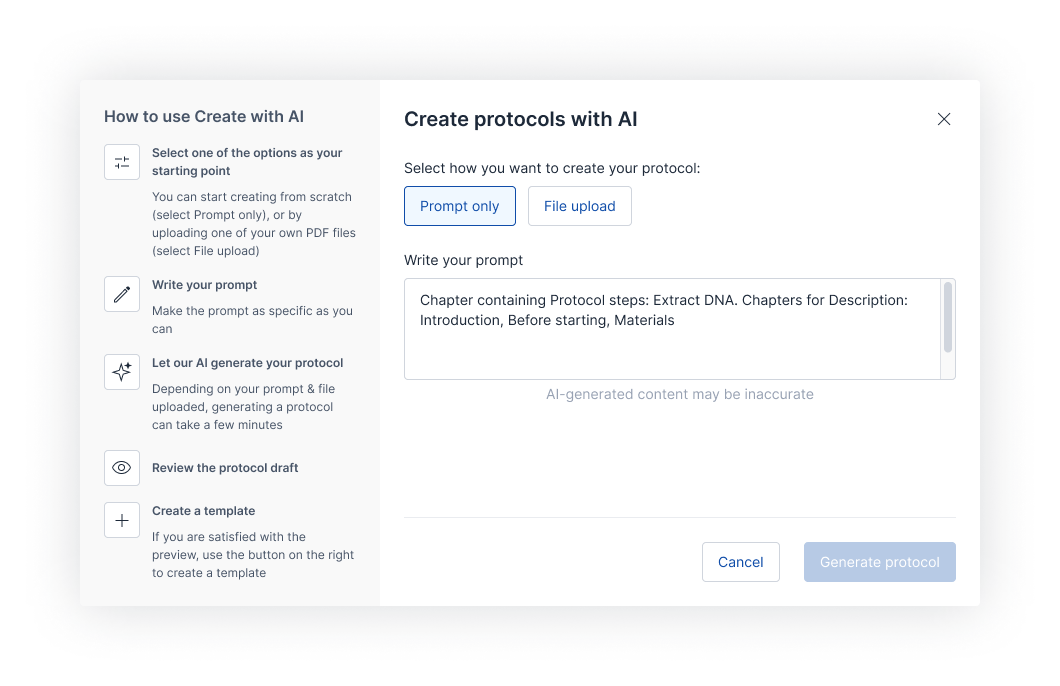
We’re expanding SciNote’s capability to import protocols with the ability to create protocol steps directly from a text prompt using AI. Simply describe how many steps you’d like to create, which components they should contain and SciNote will generate a structured set of steps — including checklists and tables — ready for you to review and import. This works both when creating new protocol templates and when adding steps to existing protocols on tasks.
To make the feature easy to find, a new “Create with AI” card has been added to the Add-ons page, and the feature is now promoted within the interface for all users. All AI-related actions are now recorded in the activity log and can be filtered in the activity feed.
Note that the “Create with AI” feature requires your SciNote admin approval.
Improvements (functional):
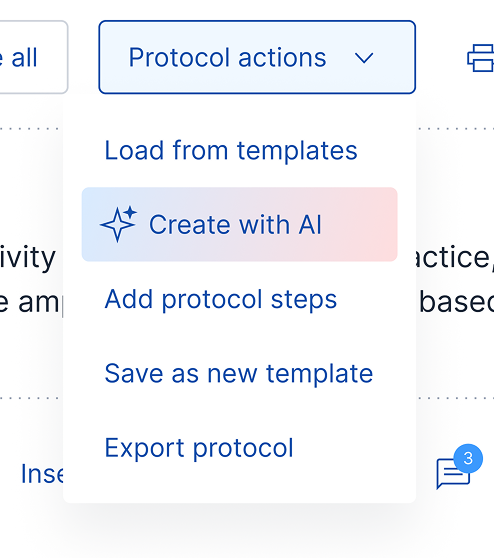
● “Create with AI” is now available in task protocols as well – find it in “Protocol options.”
● SciNote can now automatically generate checklists from bulleted lists right inside your protocol, which was created by parsing a PDF protocol with “Create with AI”.
● The inventory selector in the “Assign items” window is now visually shown as non-interactive when assigning to a specific inventory.
● Performing a new search within the “Assign items” window no longer clears items you have already selected.
● PDF and Word reports now include additional information in the footer of the default SciNote report template, including the URL of your SciNote environment and SciNote’s current version. You can opt to switch this off in the report generation wizard’s section “Additional content”.
Improvements (non-functional):
● “Import with AI” was renamed to “Create with AI”.
Bug fixes (functional):
● Fixed an issue in storage locations where clicking to deselect positions directly on the grid view was not working. Positions can now be deselected from the grid as expected.
API changes:
● Fixed an issue where filtering by the “created_at” timestamp parameter in API connections did not return correct results.
Release March 25th, 2026
CORE 1.48.0. [SciNote Premium]
This release introduces a comprehensive revamp of the Assigned Items experience within tasks, giving lab teams a more powerful and intuitive way to manage inventory in their day-to-day work.
Items can now be managed from a dedicated tab featuring a full-featured Inventory table, rich action options, and smarter workflows for assigning, consuming, and tracking inventory across experiments.
What’s new:
Assigned items tab (functional)
The Assigned Items section has been moved to its own dedicated tab within the Task view, introducing a full-featured Inventory table. The new table gives you full control over your view via Manage columns — show, hide, reorder, pin, and resize columns to surface the inventory data that matters most for each workflow.
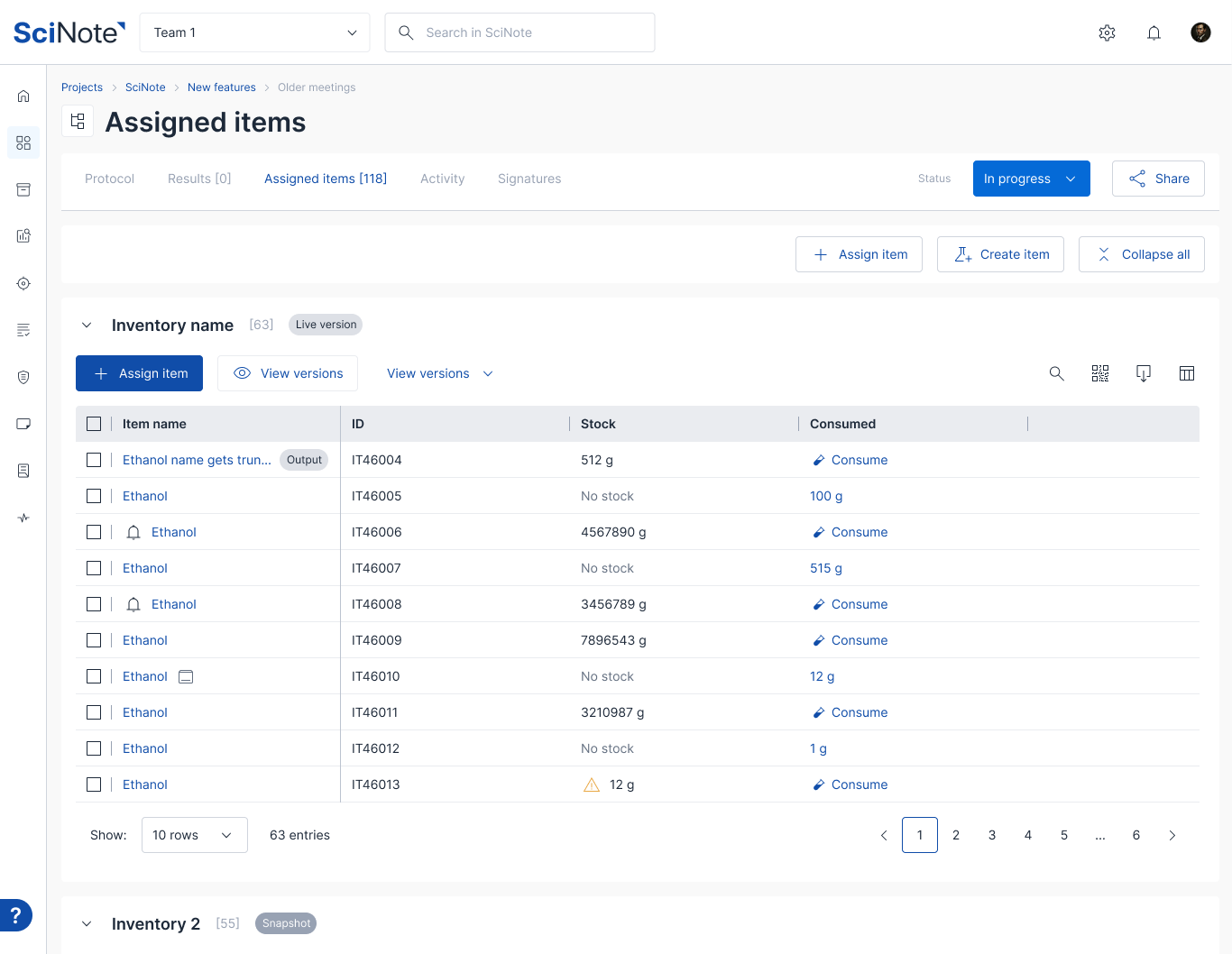
Most item actions are now available directly from the table: consume inventory items, export item lists or consumption data, print barcode labels, and create new items as well as assign and unassign items – in a similar way as you can to this in Inventories, all from within the task.
Assigning and unassigning items, as well as reviewing and navigation trough Item Snapshots are now easier and more straight-forward.
Assigned items modal window (functional)
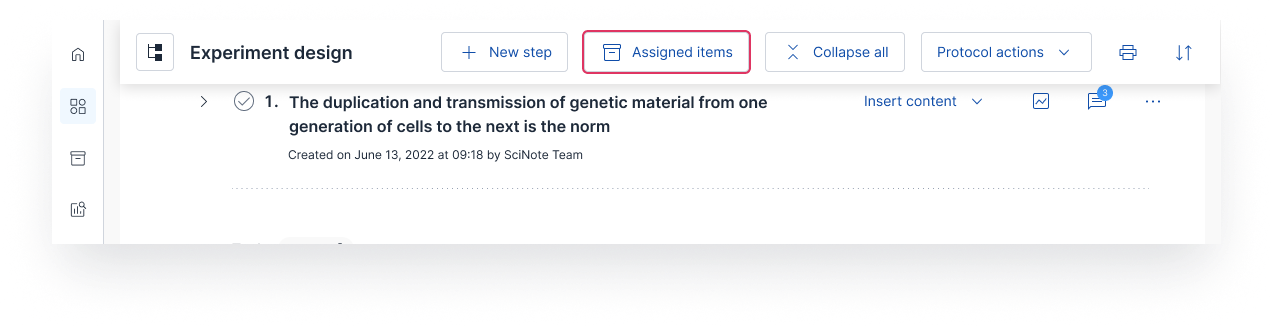
An “Assign Items” modal window has been added directly to the Protocol part of Task to allow you to interact with your assigned items while working on your Protocol. It includes the same set of improvements as the Assigned items tab, bringing you full control over your view of Assigned items directly in the context of your Protocol.
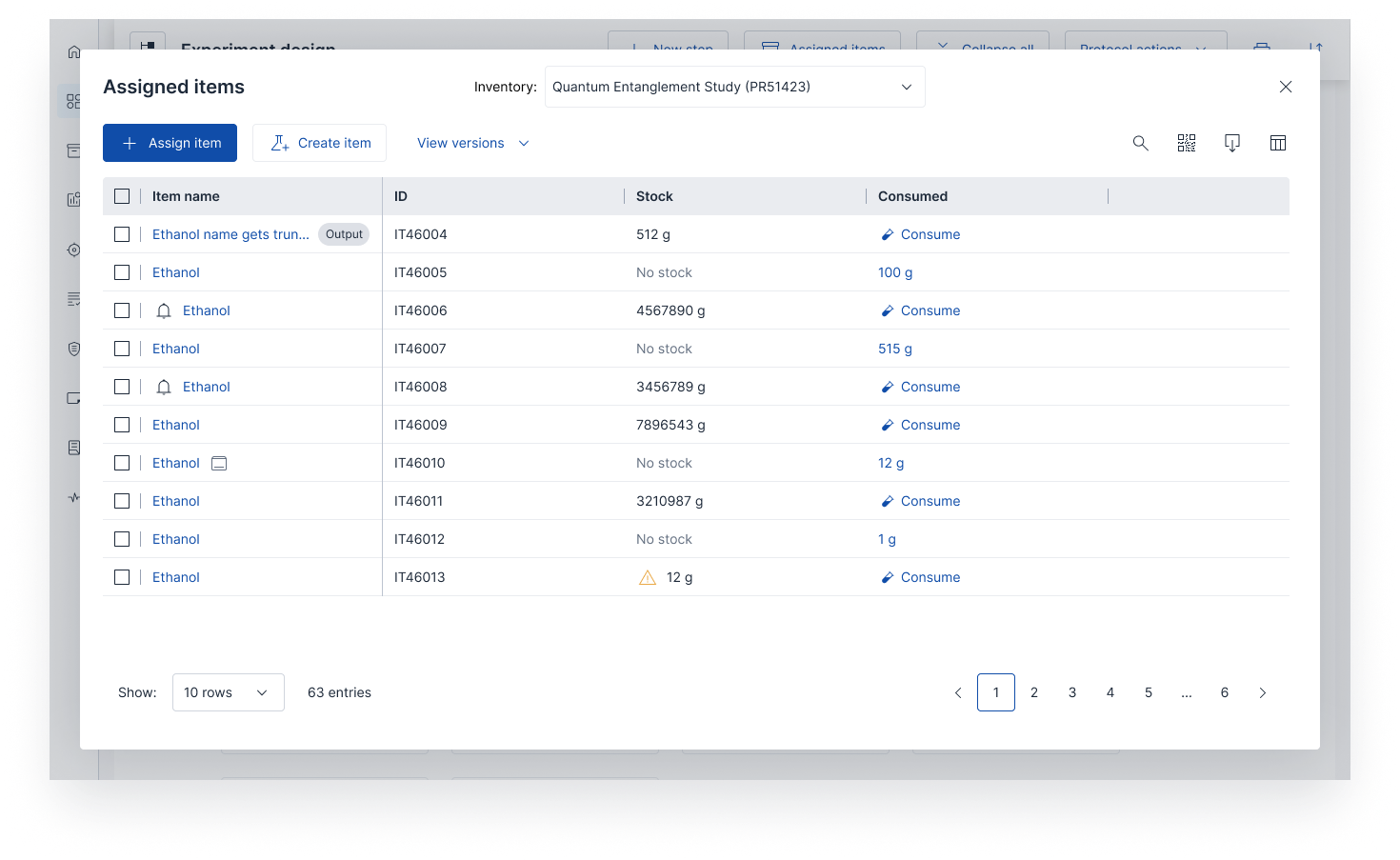
Benefits:
- Adapt inventory related columns for your Assigned items to your personal preferences.
- Column management for each inventory assigned to task.
- Easier overview of assigned items while working on a protocol.
This feature is available on all SciNote plans.
Bug fixes (functional)
- Fixed an issue where results were not loading progressively when scrolling
- Fixed an issue where consumption was allowed on archived tasks
- Fixed an issue where a project was missing from certain dropdown lists
- Fixed issue where restoring old file version on task did not trigger task update
API changes
- Webhook payloads now include Report breadcrumbs for improved contextual data in automated workflows
- Fixed an API error when updating a step on a task
Release February 25th, 2026
CORE 1.47.3. [SciNote Premium]
What’s new:
Skip steps in task protocols (functional)
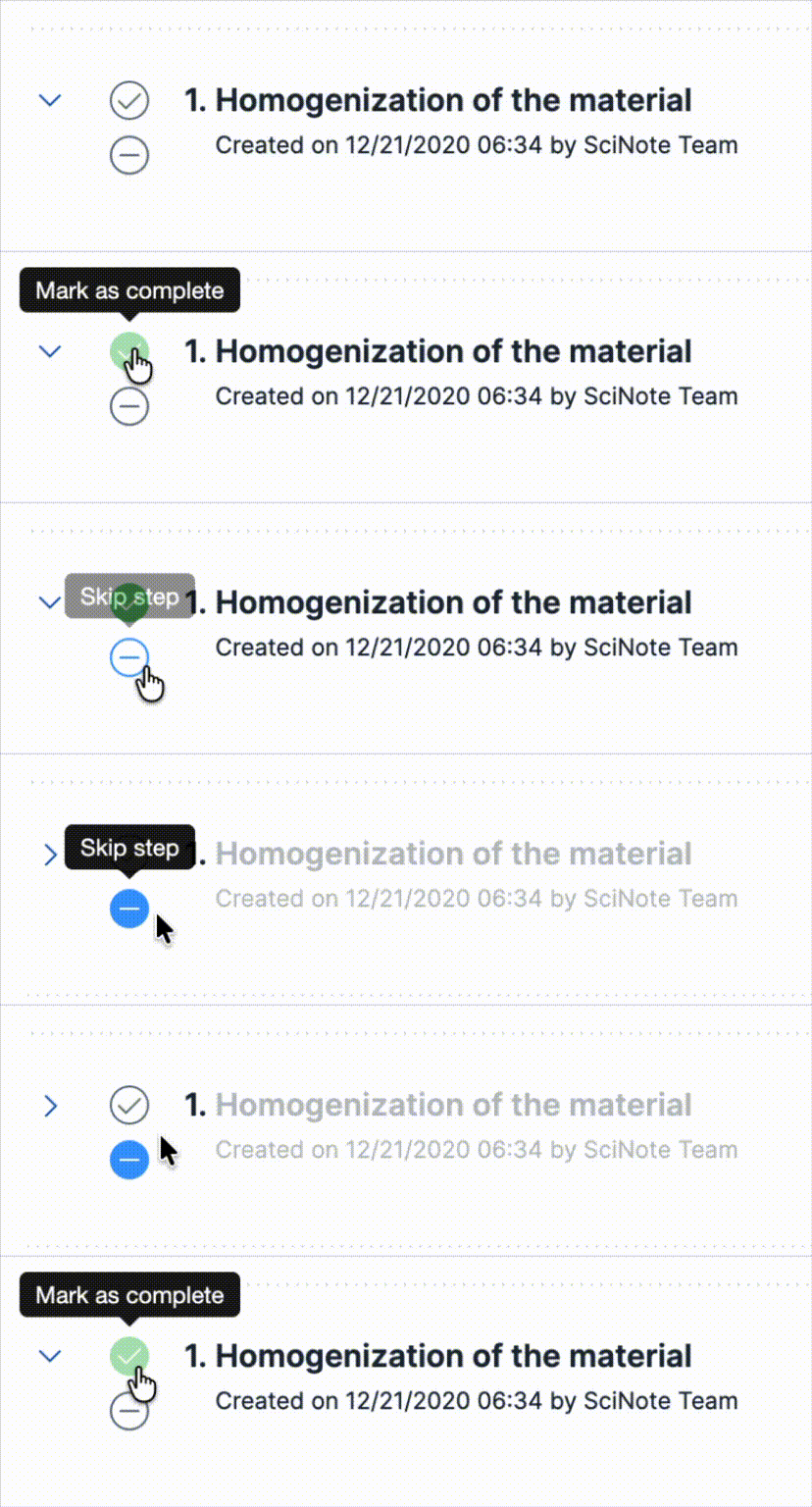
With this release we’re improving traceability of your work: you can mark steps in protocols as “Skipped” instead of only completed. Doing so will also properly show up in PDF and DOCX reports and will be tracked in Activities and Audit trails.
Skipping a step is also possible through SciNote API and will trigger workspace automations (same as marking a step as completed).
Control decimal points in SciNote Tables (functional)
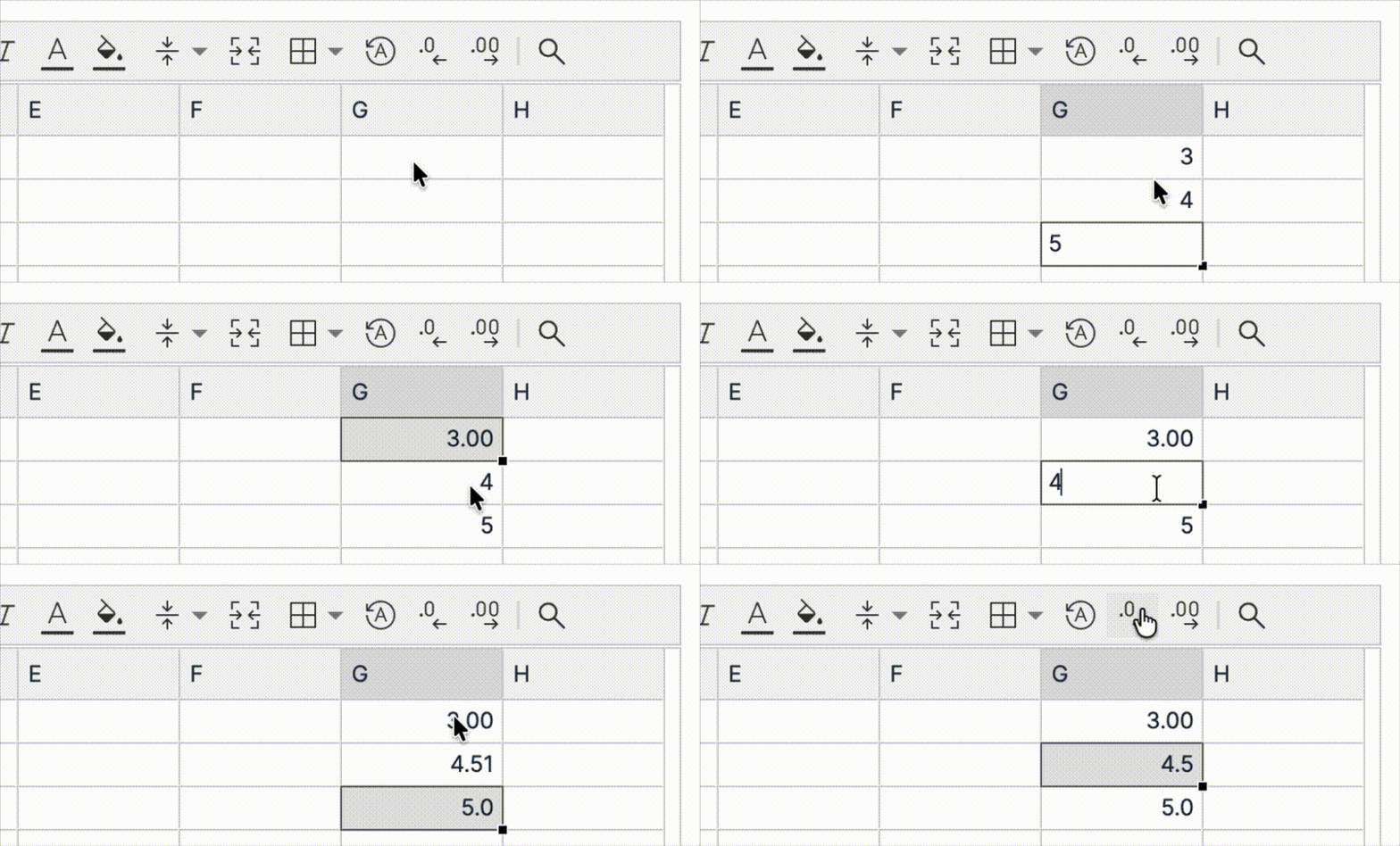
It’s now possible to control the number of decimal points for numbers in SciNote’s native tables (not the ones in Text fields).
After adding a number in a cell, use the buttons in the toolbar to increase or reduce the number of decimal points shown.
Improvements (functional):
- Fixed a bug where copying images from text field to another workspace didn’t work as expected
- Fixed a bug related to audit trail records for tag management
- Unified date-pickers across SciNote (date-picker functionality is unchanged)
API changes:
- Added support for Skip steps
Release February 11th, 2025
CORE 1.47.2. [SciNote Premium]
Improvements (non-functional):
- Technical maintenance and upgrades
API changes:
- No updates
Release February 9th, 2026
CORE 1.47.1. [SciNote FREE]
This SciNote Free release includes some of the updates that were released in CORE 1.47.0. [SciNote Premium]
Pointing out a few key updates:
- Improved Protocol templates – We’ve expanded Protocol templates so they now contain Assigned items and Results.
- Pinned results – Users can now pin important results to the top of the Task Results page so they’re easier to review and share.
- Enhanced Tags – Tags are now global within a Workspace and can be applied to any Task, regardless of Projects. Use tags to narrow global search results via “Filter by tag” (Learn more).
- Workspace automations – Enhanced Tags – Tags are now global within a Workspace and can be applied to any Task, regardless of Projects. Use tags to narrow global search results via “Filter by tag” (Learn more).
We have also rolled out some functionalities that are available in our paid plans:
- Project insights (Beta) – a new analytics view within SciNote that offers real-time visibility into your project’s progress, tasks, and team workload (Learn more).
- Import with AI (Beta) – Convert your internal protocols to SciNote faster with SciNote’s first AI-powered feature: protocol import with AI (Learn more).
Release January 28th, 2026
CORE 1.47.0. [SciNote Premium]
This release extends protocol templates so they can capture not only protocol steps and results, but also inventory items, which significantly reduces setup time and repetitive work for standardized lab processes. Additionally, you can now pin results to the top of the list in Results on Task and in Protocol Templates.
What’s new:
Assigned items on Protocol Templates
A dedicated Items page inside of Protocol template page was introduced, where you can assign inventory items. When you load a protocol template onto a task, assigned items are automatically assigned to it, removing the need to manually re‑select them each time you create a new task.
When loading Protocol template to a Task, the items will be loaded to Assigned items section of the Task, while the Protocol template will load to the Protocol section as it has up to now.
Additionally, when using “Save as new template” in your task, you can now opt to include Results and Assigned items into the newly created template.

Item templates are now available on all plans! Learn more about how to use assigned items in this article.
Pinned Results
Users can now pin important results to the top of the Task Results page so they’re easier to review and share. You can pin as many Results as you want. The order of pinned results is fixed by the sequence in which they were pinned (first pinned appears first).

Improvements (functional):
- Global search was extended to searches through content of forms used in Tasks and lists search results in existing “Task protocol” search result category.
- In-app Notification and Email notification (depending on user settings) is sent when reminding for a signature request in Signature Request widget on Dashboard.
- Location image display in storage locations improved.
Improvements (non-functional):
- Faster image previews
Image preview generation has been optimized so smaller images load significantly faster across the app. - Smoother rich text editing
Clicking outside rich text fields now saves your input without unexpectedly pulling focus back into the field. - Cleaner activity and audit trail logs
- Assigning access (users, groups, teams) no longer triggers unnecessary “updated” timestamps on many objects.
- Minor table layout changes are no longer treated as data changes and will not be recorded in activities or audit trails, nor will they trigger automations. Examples include column and row resizing and calculated cell values. All actual data and value changes will continue to be recorded.
- Browser tab titles for projects, forms, protocol templates, labels, and reports have been corrected and standardized.
Bug fixes (functional):
- Direct URLs to task results now correctly switch to the right workspace (if the user has access), preventing misleading 404 errors.
- Fixed a date picker bug where users in time zones behind UTC (e.g. US time zones) could see a one day offset on project/experiment start and due dates. Dates now appear and save correctly regardless of time zone.
- Fixed issue with resizing of single-column tables.
Bug fixes (non-functional):
- Fixed cases where text/Office files could get stuck endlessly “loading” instead of showing a preview.
- Resolved PDF report issues where drawings or parts of the content were missing or displayed with errors in Adobe.
- Improved how file name and content updates are tracked to avoid edge case inconsistencies in audit data.
- On Insights, long usernames no longer overflow their UI fields; the selected Insight remains correctly highlighted in navigation; Experiments in Status overview widget are now linked.
API changes
- The API can now restore archived PET objects, giving admins more options for recovering important data.
- API endpoints for uploading attachments to Task Protocol steps and Results are now supporting also direct upload of files in addition to base64.
Release January 7th, 2026
CORE 1.46.0. [SciNote Premium]
This release introduces the ability to add results to protocol templates in SciNote. With this improvement, SciNote users can save and reuse complete protocol structures.
What’s new:
A dedicated Results page inside of Protocol template page. The Results in Protocol templates, work exactly the same as on Task — you can add as many results as you like, add content blocks, and link the results to specific steps in your protocol for additional traceability.
When loading Protocol template to a Task, these results will be loaded to Results section of the Task, while the Protocol template will load to the Protocol section as it did up to now.
Benefits:
- Less manual work to add
- Enforced structure of Results in relation to Protocols
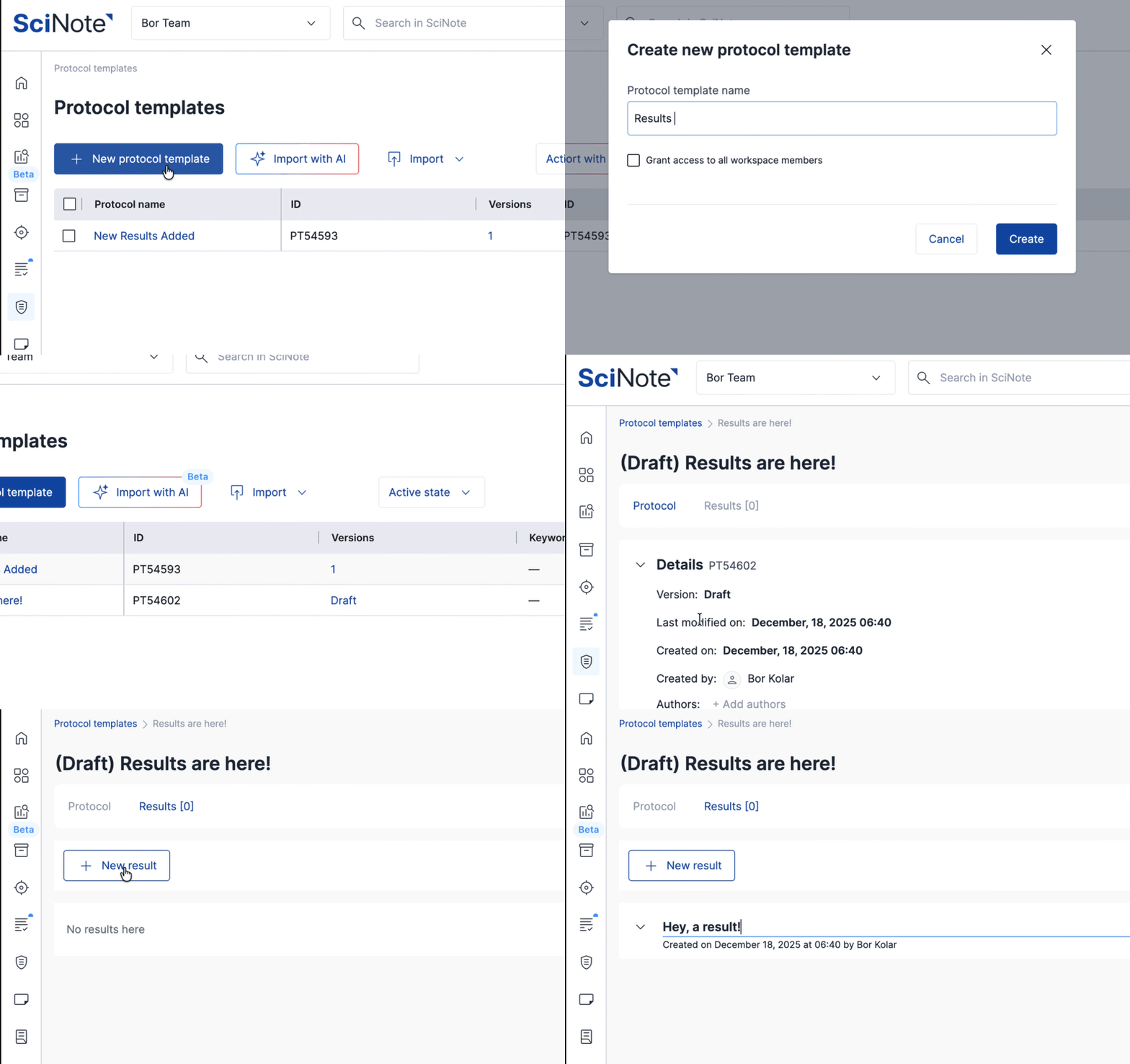
Result templates are now available on all plans! Learn more about how to use results in this article.
Improvements (non-functional):
- Removed support for nested lists in text fields in tasks
Bug fixes (functional):
- Fixed a bug where automations changed the status of a task with no actual action.
- Fixed a bug where dates where not properly displaying inside of published forms on tasks.
- Fixed a bug where a user would not get notifications when tagged in Notes section of the task and in Project descriptions.
Bug fixes (non-functional):
- Fixed a bug where automations changed the status of a task with no actual action.
API changes
- The existing “Get step form responses” API endpoint was improved: the form field ID was added to the form_field_value serializer.
SciNote User Reviews

Connect with us


SciNote Newsletter
Receive SciNote ELN news, webinars and articles.